
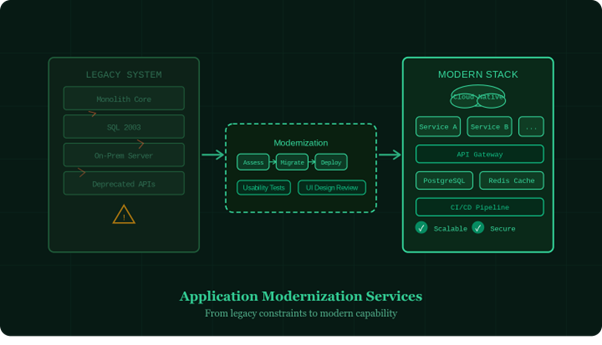
Every business that has been operating for more than a decade is carrying some version of the same problem. Somewhere in the stack, there is a system that was built for a different era, one that no longer matches how the business operates, how customers expect to interact with it, or how the teams maintaining it actually work. These systems do not announce themselves as problems. They announce themselves as slowdowns, workarounds, rising maintenance costs, and the quiet accumulation of things you cannot do because your infrastructure will not allow it. That is the problem application modernization services are built to solve.
What Application Modernization Services Actually Involve
The term gets used loosely, so it is worth being specific. Application modernization services cover the technical and strategic work of moving software systems from outdated architectures to ones that are cloud-native, maintainable, scalable, and integrated with modern tooling. The scope can range from re-platforming a single application to a multi-year program that restructures how an entire enterprise manages its digital infrastructure.
At BayOne, application modernization services are not treated as a lift-and-shift exercise. Moving old code to a new server and calling it done is not modernization. Real modernization addresses the architectural decisions that made the system hard to work with in the first place: tightly coupled components, manual deployment processes, monolithic data models, fragile integrations, and interfaces that were designed for a set of assumptions that no longer hold.
The Hidden Cost of Staying Put
Organizations that delay modernization often do so because the cost of change feels large and the current system, despite its problems, still technically functions. What this calculation consistently underweights is the cost of staying put.
Legacy systems are expensive to maintain in ways that do not always appear as a single line item. The developers who understand the old codebase become harder to replace as that knowledge base shrinks. Security vulnerabilities in unsupported frameworks require custom patches or workarounds. Integration with newer tools and data sources requires brittle custom connectors that break regularly. Feature development slows to a crawl because every change risks destabilizing something upstream.
There is also a competitive dimension. Organizations operating on modern infrastructure move faster. They can respond to market changes, ship new features, and adopt emerging technologies at a pace that legacy-bound competitors simply cannot match. The gap compounds over time.
Why Usability Testing Services Belong in Every Modernization Program
A modernization program that focuses exclusively on the back-end is only solving half the problem. Users interact with the front end, and a newly rebuilt system that performs better technically but feels no different to use will not deliver the business outcomes the modernization was meant to create.
This is where usability testing services play a defining role. Rather than assuming the new system’s interface is an improvement, usability testing services put real users in front of real workflows and observe what actually happens. Where do people hesitate? Where do they make errors? Which navigation patterns match their mental model of the task, and which work against it?
Usability testing services conducted at key milestones during a modernization project, not only at the end, catch problems at a stage where fixing them is relatively inexpensive. A navigation structure that feels logical to the development team may be confusing to the finance analyst who uses it for four hours a day. Usability testing surfaces that gap before it becomes a support burden or an adoption problem.
What Good Application Modernization Looks Like in Phases
Structuring the work well is as important as doing the work well. A full modernization engagement at BayOne typically moves through these stages:
- Discovery and audit: Map the current system’s architecture, dependencies, data flows, and integration points. Identify technical debt, security risk, and performance bottlenecks. Prioritize what to modernize first based on business impact and migration complexity.
- Architecture design: Define the target state. Choose between microservices, containerization, serverless, or a hybrid approach based on the actual workload characteristics. Design the data model, API contracts, and integration patterns that the new system will use.
- Incremental migration: Move functionality in controlled phases, running old and new systems in parallel where necessary to reduce risk. Validate each phase against defined acceptance criteria before moving to the next.
- UI design services integration: Redesign interfaces in parallel with back-end migration. UI design services applied during this phase ensure that the new system looks and behaves the way modern users expect, not as a replica of the old interface with a fresh coat of paint.
- Usability testing and iteration: Test with real user groups at prototype stage and again in staging before go-live. Use findings to refine before the system carries production load.
- Deployment and monitoring: Release to production with observability tooling in place. Track performance, error rates, and user behavior from day one.
UI Design Services as a Modernization Multiplier
Infrastructure changes become visible to end users through the interface. A modernization program that does not invest in UI design services risks delivering a technically superior system that users resist because it is unfamiliar, inconsistent, or harder to learn than what it replaced.
UI design services during modernization cover more than visual refreshes. They establish design systems that bring consistency across all surfaces of the application, define interaction patterns that reduce the cognitive load of daily tasks, and create components that developers can implement accurately without reinterpreting design intent at every screen.
When UI design services run in step with back-end development rather than after it, the interfaces that ship reflect both the new system’s actual capabilities and the user behaviors revealed through usability testing. That combination is what separates modernization projects that achieve adoption from those that technically succeed but quietly fail because users work around them.
What to Look for in an Application Modernization Partner
Not all modernization engagements are equal. The right partner shapes both outcome and experience. Look for a clear methodology to avoid scope drift, domain expertise to handle industry constraints, and full-stack capability. When design, testing, and development align, it reduces vendor complexity and ensures insights translate into better architecture and user experience.
Frequently Asked Questions
What is the difference between application modernization and a simple software upgrade?
A software upgrade typically involves updating a system to a newer version of the same architecture. Application modernization services go further by rethinking the underlying architecture itself, moving from monolithic structures to more maintainable, scalable patterns and addressing the structural decisions.
How do usability testing services fit into a modernization project?
Usability testing services validate that the modernized system actually improves the experience for the people who use it, not just the teams maintaining it. They are typically conducted at the prototype stage and again before go-live, with findings used to refine interfaces and workflows before the system carries production load.
When should UI design services be brought into a modernization program?
UI design services should begin in parallel with back-end development, not after it. Starting design work early allows interfaces to be built around the new system’s actual capabilities rather than retrofitted.
How long does a typical application modernization engagement take?
Timelines vary widely depending on the size and complexity of the existing system, the number of integrations involved, and how the migration is phased. A focused engagement on a single application might take three to six months.
